
TikTok Ads
Connect your TikTok Ads account to sync campaign data and enable attribution.
URL parameters setup
Setting up tracking parameters
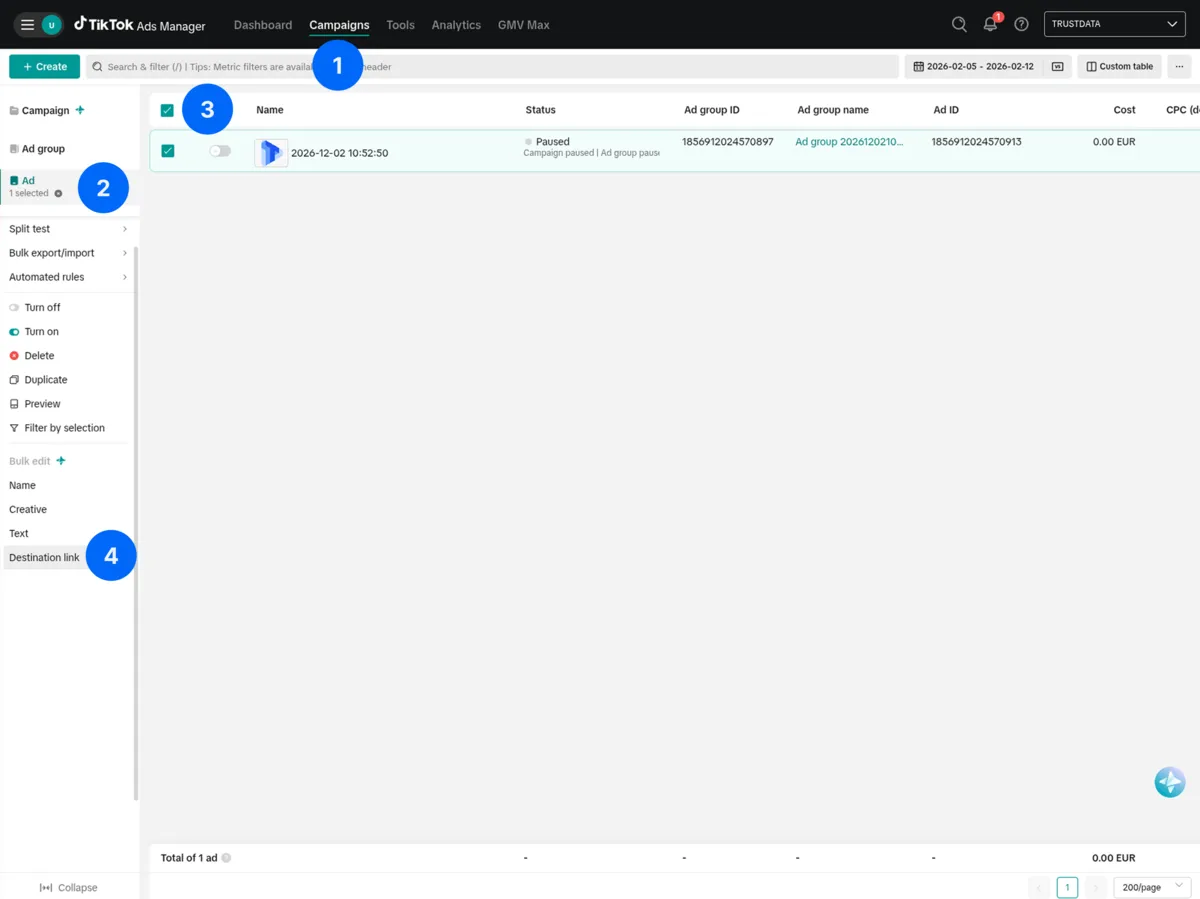
TikTok has no account-level URL parameters. Add tracking parameters at the ad level with bulk edit:
- In TikTok Ads Manager, go to the Campaigns page
- Go to the Ad level in the left sidebar
- Select the ads to edit using the checkboxes
- Under Bulk edit in the left panel, click Destination link
- In the destination link field, paste your landing page URL with the tracking parameters appended, then click Apply to all
- Click Review to confirm and save your changes
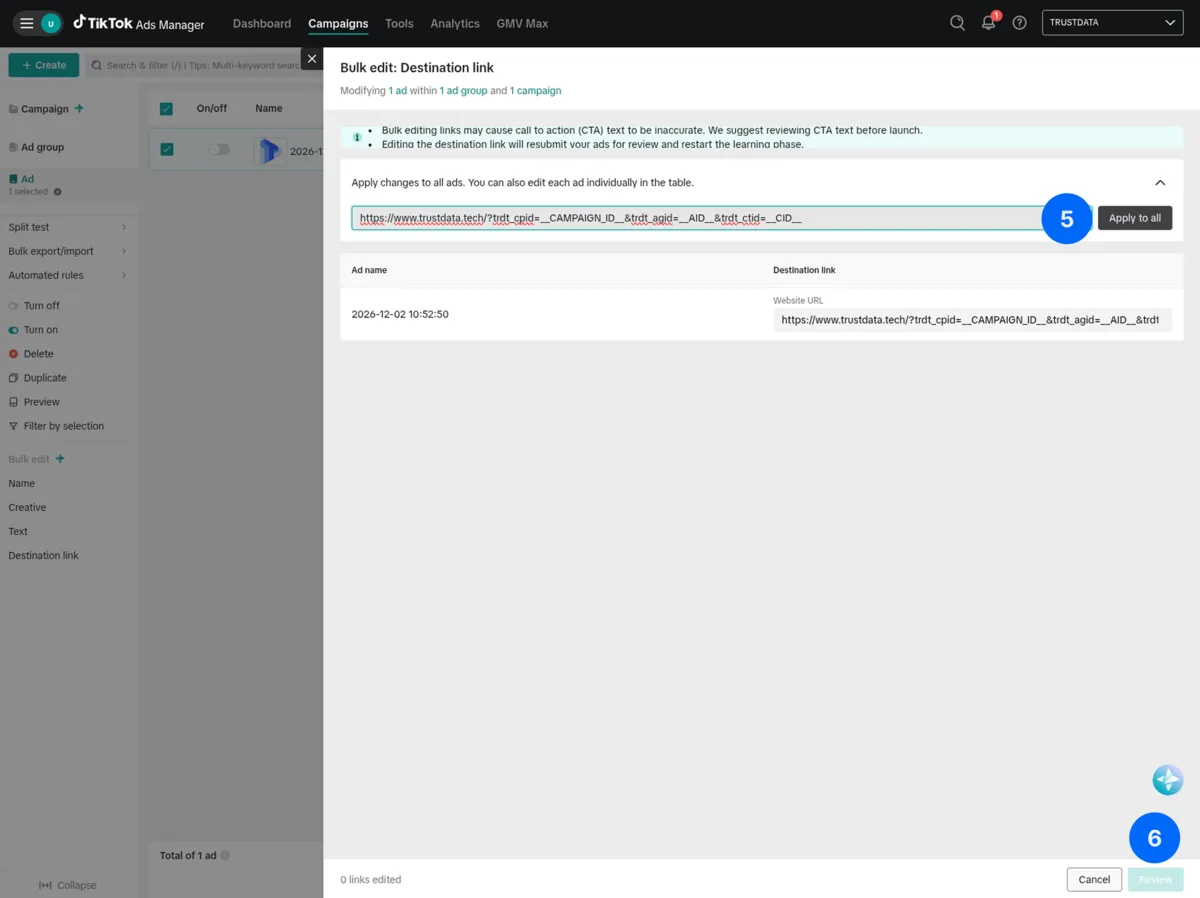
The tracking parameters to append to your URL:
trdt_cpid=__CAMPAIGN_ID__&trdt_agid=__AID__&trdt_ctid=__CID__
Available dynamic macros
| Macro | Description | Example Value |
|---|---|---|
__CLICKID__ | TikTok Click ID (ttclid) | E.C.P.CjwKCA... |
__CID__ | Creative/Ad ID | 1234567890 |
__CAMPAIGN_ID__ | Campaign ID | 9876543210 |
__CAMPAIGN_NAME__ | Campaign name | Summer_Sale |
__AID__ | Ad group ID | 1122334455 |
__PLACEMENT__ | Placement | TikTok |
Recommended URL parameter string
To capture campaign, ad group, ad, and click IDs:
trdt_cpid=__CAMPAIGN_ID__&trdt_agid=__AID__&trdt_ctid=__CID__&ttclid=__CLICKID__
Verify your setup
- Preview the ad in TikTok Ads Manager
- Click through to your landing page
- Check the URL:
Expected URL:
https://example.com/landing?trdt_cpid=9876543210&trdt_agid=1122334455&trdt_ctid=1234567890&ttclid=E.C.P.CjwKCA...
Connecting in TrustData
After you add the URL parameters:
- Go to Settings → Data Sources
- Click Add Data Source → TikTok Ads
- Click Connect with TikTok
- Log in with your TikTok for Business account
- Select the advertiser accounts to sync
- Click Confirm, then Save
Required permissions
TrustData requests these permissions:
Ad Account Management(read-only)Ad Insights(read-only)
TrustData only reads data. We never modify your campaigns.
Business center access
For Business Center accounts:
- Your TikTok account must have access to the advertiser accounts
- Select specific advertiser IDs during setup
- Each advertiser syncs independently
Synced data
| Data Type | Description |
|---|---|
| Campaigns | Name, objective, budget, status |
| Ad Groups | Name, targeting, bid, schedule |
| Ads | Creative info, name, status |
| Metrics | Impressions, clicks, spend, CTR, CPC |
Date range
- Historical: Last 60 days on first sync
- Ongoing: Daily incremental sync
Metrics available
- Impressions
- Clicks
- Click-through rate (CTR)
- Cost per click (CPC)
- Total spend
- Video views (25%, 50%, 75%, 100%)
- Engagement (likes, comments, shares)
Attribution matching
TrustData matches TikTok clicks to conversions:
TrustData captures ttclid only to forward conversions to TikTok when the visitor consents. Consent masking drops it. It is never the attribution key.
TikTok pixel vs TrustData
TikTok's pixel provides:
- In-platform conversion reporting
- Optimization signals for bidding
TrustData provides:
- Cross-platform attribution
- First-party data collection
- Unified view with other channels
Recommendation: Use both. TikTok pixel for optimization, TrustData for attribution.
Conversion forwarding
TrustData can forward server-side conversion events to the TikTok Events API. This improves attribution accuracy and helps TikTok optimize ad delivery.
Getting an access token
Generate a long-lived access token from the TikTok Business API portal:
- Go to TikTok for Business Developers → select your app
- Navigate to Tools → Generate Access Token
- Select the advertiser accounts and grant the
Event Managementpermission - Copy the generated token
Finding your Pixel Code
- In TikTok Ads Manager, go to Tools → Events
- Select Web Events → click on your pixel
- The Pixel Code appears at the top (format:
CXXXXXXXXX, e.g.,C1A2B3C4D5E6F7G8)
Configuring in TrustData
- Go to Settings → Attribution IDs → select your ID → Edit Tracking Config
- Open the Forwarding tab
- Under TikTok Events API:
- Enable TikTok
- Enter your Pixel Code
- Paste the Access Token
- Click Save Configuration
If you leave the access token empty, TrustData uses the OAuth token from your connected TikTok Ads data source.
Troubleshooting
"Advertiser account not found"
- Verify that your TikTok for Business account has advertiser access
- Check that you logged in with the correct TikTok account
- Check that the advertiser account is active
"No data synced"
- Confirm that the advertiser account has active campaigns with spend
- Check that campaigns ran within the last 60 days
- Verify API access in TikTok Business Center
"ttclid not captured"
- Verify that the
__CLICKID__macro is in your URL parameters - Check that your landing page does not strip query parameters
- Test with a real ad click, not a preview
"URL parameters not working"
- TikTok requires parameters at the ad level
- Check for typos in macro names (case-sensitive)
- Check for conflicting parameters in the destination URL
Spark ads
For Spark Ads (boosted organic posts):
- URL parameters work the same way
- Add parameters in the ad setup, not the original post
- TikTok does not modify the original post URL