
Connectors
Pinterest Ads
Connect Pinterest Ads and add the URL tracking parameters.
Connect your Pinterest Ads account to sync campaign data and enable attribution.
URL parameters setup
Do this first. Add the URL parameters in Pinterest Business Manager before you connect Pinterest Ads in TrustData.
Add the tracking parameters
Pinterest supports URL parameters at the ad account level. They apply to all current and future campaigns automatically.
- In Pinterest Business Manager, go to Assets → Ad accounts
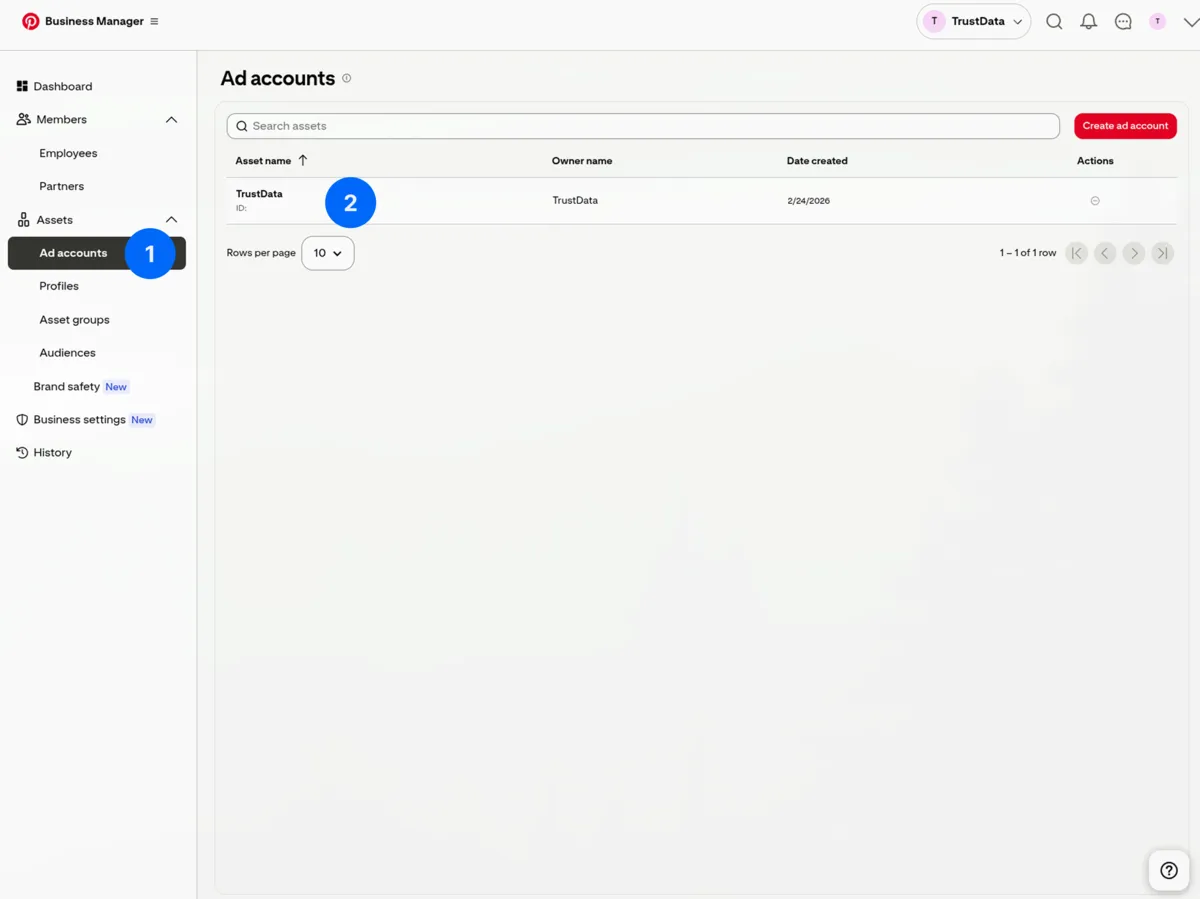
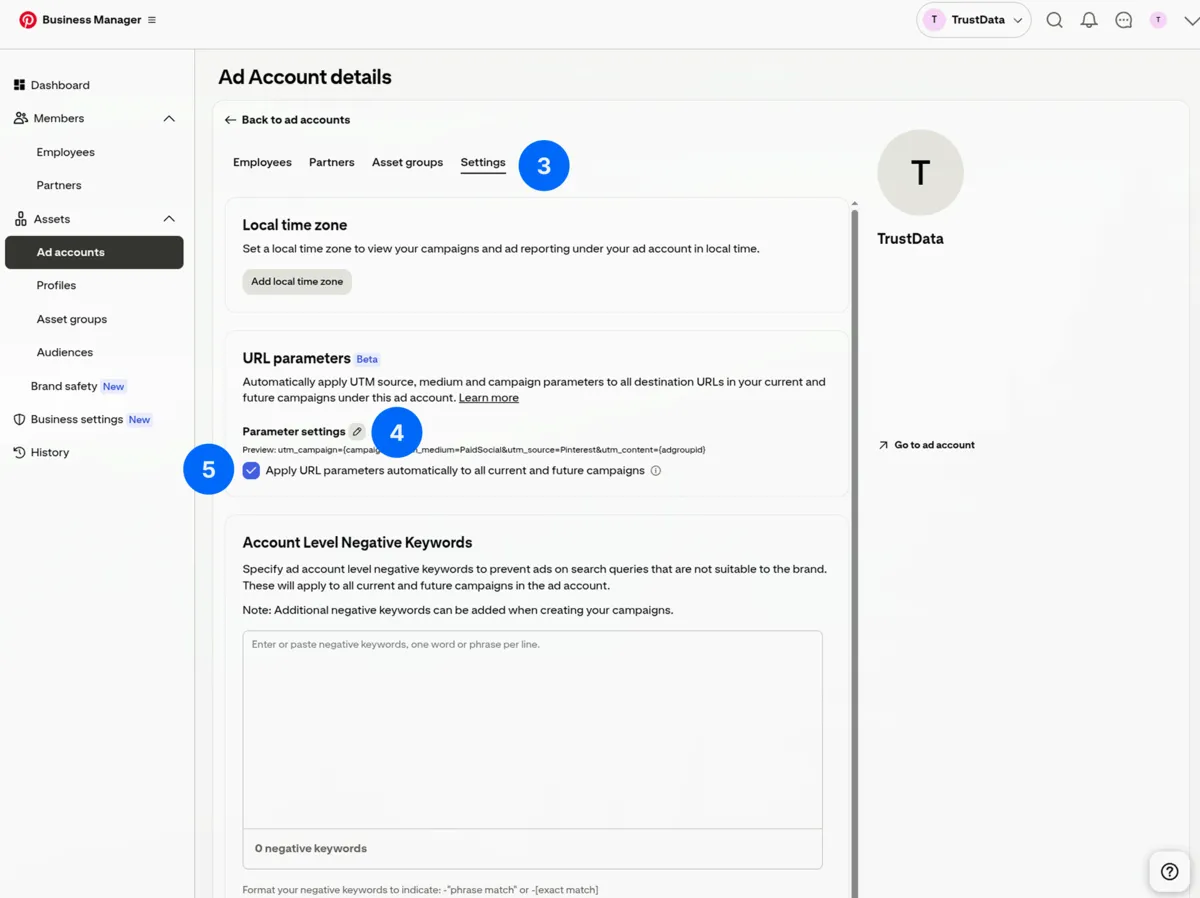
- Click your ad account. Open the Settings tab
- Under URL parameters, click the edit icon next to Parameter settings
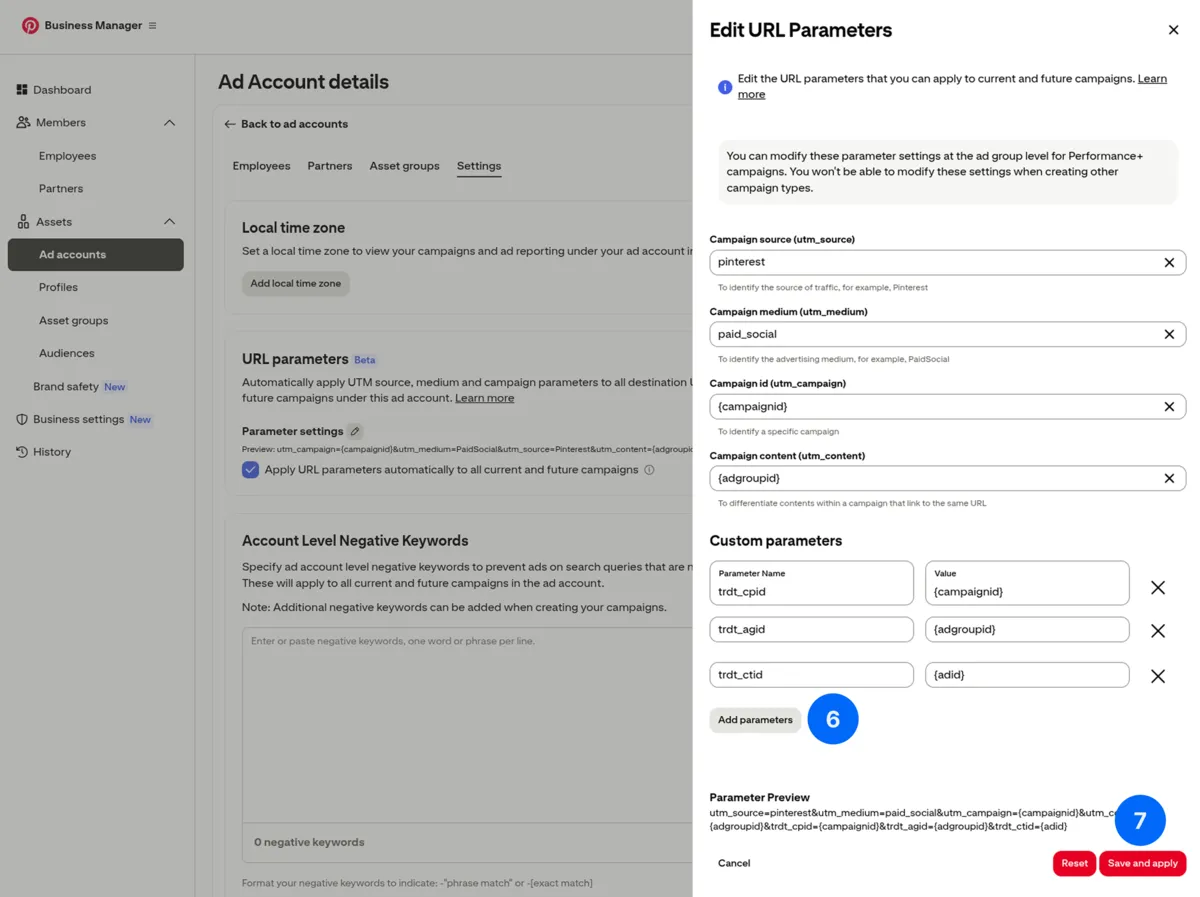
- In the Edit URL Parameters modal, scroll to Custom parameters. Add:
| Parameter name | Value |
|---|---|
trdt_cpid | {campaignid} |
trdt_agid | {adgroupid} |
trdt_ctid | {adid} |
- Check Apply URL parameters automatically to all current and future campaigns
- Review the parameter preview at the bottom
- Click Save and apply
Available dynamic macros
| Macro | Description | Example value |
|---|---|---|
{campaignid} | Campaign ID | 12345678901234567 |
{adgroupid} | Ad group ID | 98765432109876543 |
{adid} | Ad ID | 11223344556677889 |
{campaignname} | Campaign name | Summer_Sale |
{adgroupname} | Ad group name | Broad_Interest |
Verify the parameters
After you save, the parameter preview in the modal shows the full tracking string. You can also click through an active ad to your landing page and check the URL.
Expected URL:
https://your-site.com/landing?trdt_cpid=12345678901234567&trdt_agid=98765432109876543&trdt_ctid=11223344556677889
Connect in TrustData
After you add the URL parameters:
- Go to Settings → Data Sources
- Click Add Data Source → Pinterest Ads
- Click Connect with Pinterest
- Log in with your Pinterest account
- Grant TrustData permission to view Pinterest Ads data
- Select the Pinterest Ads accounts to sync
- Click Save
Required permissions
TrustData requests these permissions:
- Read Pinterest Ads data (campaigns, ad groups, ads, and metrics)
TrustData reads data only. It never modifies your campaigns.
Account access
Your Pinterest account must have Admin or Analyst access to the Pinterest Ads account.
Synced data
| Data type | Description |
|---|---|
| Campaigns | Name, status, budget |
| Ad groups | Name, targeting, bid |
| Ads | Name, creative type, status |
| Metrics | Impressions, clicks, spend, CTR, CPC |
Date range
- Historical: Last 90 days on first sync
- Ongoing: Daily incremental sync
Attribution matching
TrustData matches Pinterest clicks to conversions:
Loading diagram…
Troubleshooting
"No ad accounts found"
- Verify your Pinterest account has access to the Pinterest Ads account
- Confirm you selected the correct Pinterest account during OAuth
- Disconnect the data source, then connect it again
"URL parameters not appearing"
- In Business Manager, go to Assets → Ad accounts → Settings → URL parameters. Confirm you saved the parameters
- Confirm you checked Apply to all current and future campaigns
- Confirm no redirect removes the query parameters
"No data synced"
- Confirm the Pinterest Ads account has active campaigns with spend in the last 90 days
- Confirm you selected the correct Pinterest Ads account when you connected